Your familiar apps.
On your new iPhone.
Transfer apps through your computer or restore your App Store purchases unavailable in Russia. Original IPAs from Apple, over USB, without jailbreak.
- Free and open source
- No Perenos server

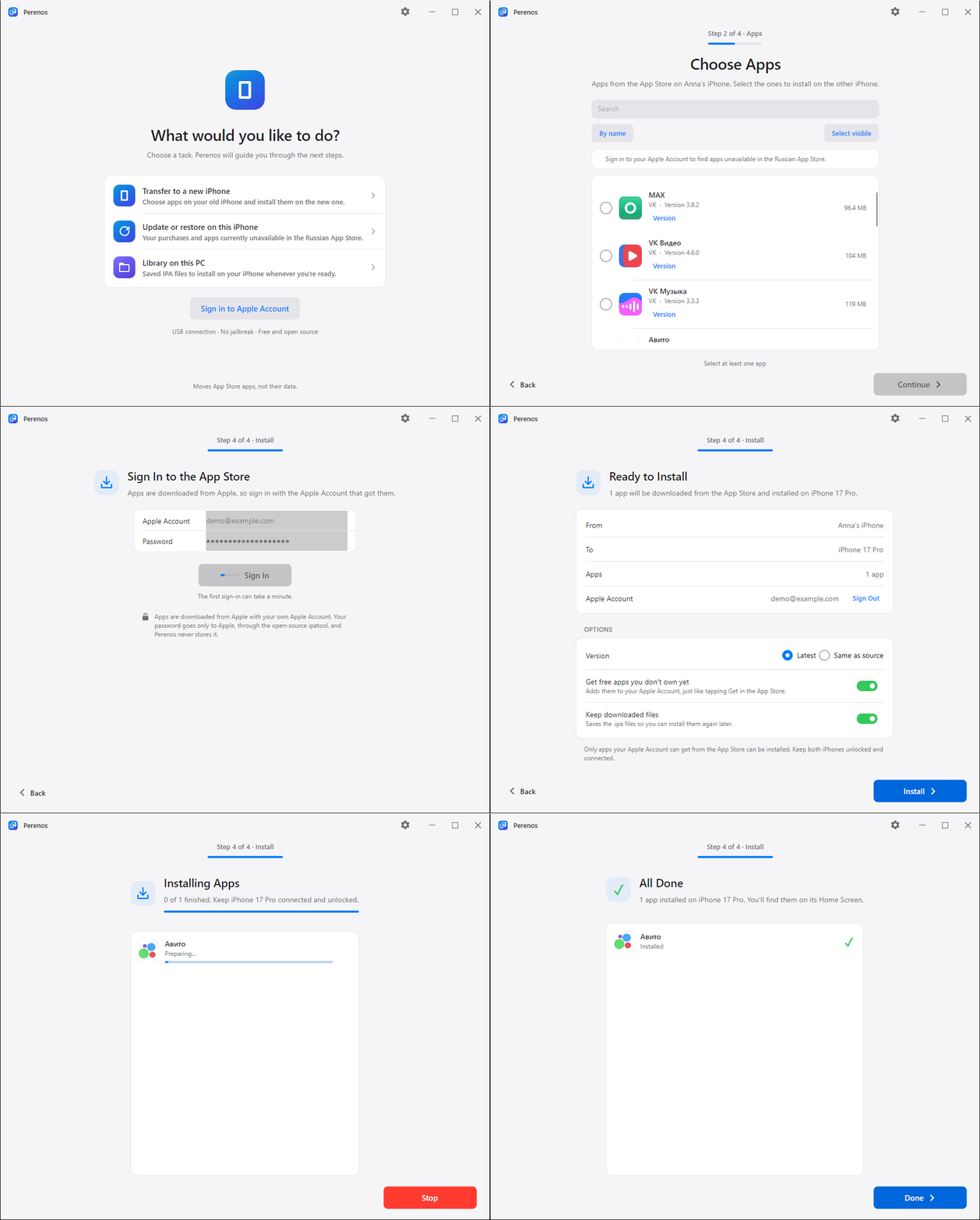
You choose. We transfer.
Select only the apps you need, with search and sorting. Every step is visible, including failures and an easy way to retry.
Your history in one list.
Account purchases and catalog candidates share one searchable list, without filters. Catalog candidates are never presented as confirmed purchases.
Ready when you are.
Save packages now and install later. Version, iOS requirements and compatibility with your iPhone are checked before installation.
Recorded in the real app. Devices, accounts and apps are fictional. Scenario animations follow your theme; the full video uses the light app theme. Scroll the image to see details.
Watch the complete workflow MP4
- 174 automated testsin Windows and macOS CI
- MIT open sourceinspect the code yourself
- SHA-256 and Sigstoreverifiable package provenance
- Local by designno ads or hidden telemetry
Choose your workflow
Perenos does not install everything at once or change the Apple Account on your phone. You decide what belongs on the new iPhone.
Transfer to a new iPhone
Select apps on the old phone and install only what you need on the new one.
Update or restore
Find your App Store purchases and install available versions that are missing from the Russian storefront.
Build your own library
Save original IPAs on your computer and return to them when your new iPhone is ready.
- 01
Connect
Old and new iPhones, together or one at a time. Trust your computer on the phone.
- 02
Choose
Select only the apps, purchases or saved packages you need.
- 03
Install
Sign in to the purchaser's account on the computer and follow clear progress.
Get back
what was yours.
If an app was acquired with your Apple Account, it may still be available for download after disappearing from the Russian App Store.
- Connect your iPhone over USB and tap Trust.
- Sign in to the purchaser's account only on the computer.
- Select the app and install it.
Apple verifies the license and decides whether to serve the package. We do not promise to restore every app or download unknown copies.

Original packages from Apple's servers

Your apps, on your computer
Save now.
Install later.
Build your own library of original apps on your computer. No file-sharing sites or untrusted packages.
- Icons, versions and size for each app
- iOS requirements checked before installation
- Your own IPAs with valid licenses and signatures
The license stays with the purchaser. Installing an IPA does not bypass FairPlay or guarantee launching without an Apple Account on the device.
Live screenshots
The Perenos interface on a real iPhone: actual apps, icons and sizes from the connected device. The device name is hidden; apps and data were not modified.

Your data.
Yours alone.
Perenos has no server of its own, no ads and no hidden analytics. Apps and purchases are downloaded directly from Apple, and your files stay on your computer.
How security worksProtected session
The session key is protected by Windows DPAPI or macOS Keychain. Your password is not stored.
Open implementation
Both the app and ipatool source code are available for inspection.
Verifiable builds
SHA-256 and Sigstore for releases. They do not replace Apple or Windows publisher signatures.
Local library
IPAs stay with you. They may contain the purchaser's email, so do not publish them.
Before you start
Need more help? Ask on GitHub.
Can I restore an app removed from the App Store?
Sometimes, if your Apple Account owns it and Apple still serves it to that account. Find it in the unified list of purchases and catalog candidates, select it and install.
How do I restore VK Music?
Connect your iPhone, sign in to the purchaser's account on your computer, find VK Music in the unified list and install it. Apple verifies the license when downloading.
Does Perenos work on a Mac?
The new Avalonia version shares its codebase between Windows and macOS. Apple Silicon and Intel Macs running macOS 15 or later are supported. Test DMGs are marked -test and are not notarized; Gatekeeper may warn about an unidentified developer.
Can I install an app without an Apple Account?
Downloading requires the purchaser's account on the computer. A saved IPA installs without signing in again on the computer, but iOS may request the purchaser's account at launch or update. FairPlay is not bypassed.
Are messages and app settings transferred?
No, only apps are transferred. Restore their data using iCloud, a backup or the app's own synchronization.
Do I need a jailbreak?
No. Perenos works with a regular iPhone over USB; it does not hack iOS or bypass FairPlay. IPAs install as ordinary Apple Account purchases.
Is Perenos free?
Yes. Perenos is free and open source under the MIT license, with no ads, subscriptions or hidden telemetry.
Do I need to change my Apple ID region or iPhone account?
No. You sign in to the purchaser's Apple Account only on the computer; the account, region and settings on your iPhone stay unchanged.
Make your new iPhone
feel like home.
Download Perenos from the official GitHub Releases page.
Version 1.9.0, Windows and macOSmacOS is currently available as test DMGs. They are ad-hoc signed, without Developer ID or Apple notarization. Gatekeeper may warn about an unidentified developer. First launch on a physical Mac and operations with a real iPhone have not been verified.